Description
You finished the work. Now you need to get paid without the paperwork turning into a mess. A Word doc you retype each time will break. A total you add up by hand is easy to miss. You want a quote that looks clean and an invoice that adds up correctly, both ready to send as PDF in a few minutes.
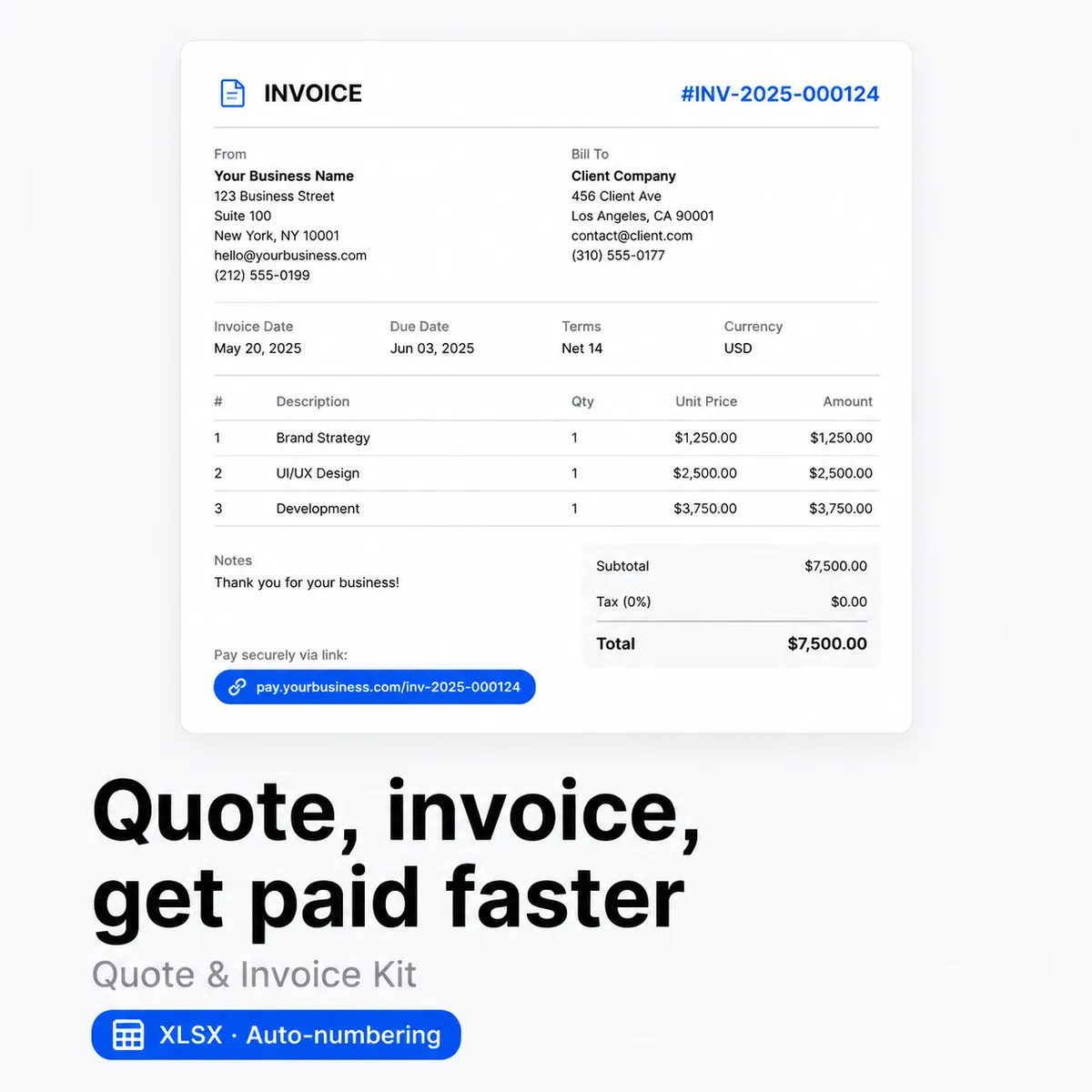
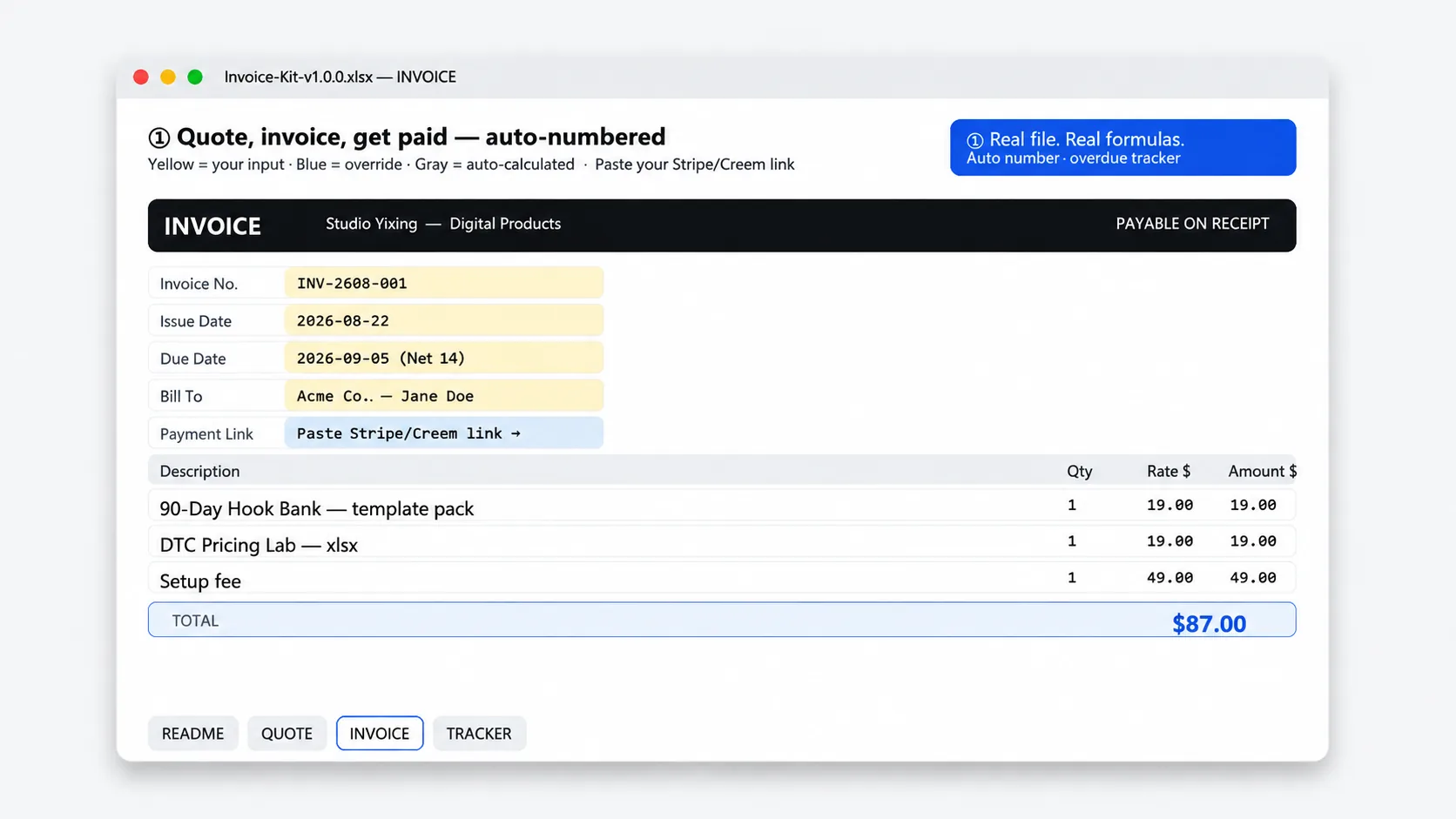
This kit is one editable file with linked quote and invoice sheets. You set currency, tax rate and payment link once in Settings and both sheets pull from there. Line items calculate by themselves, the invoice number increments on its own, and you export to PDF when you are ready. Nothing to install. The formulas sit in the cells where you can check them.
Price: $19 once. No subscription. No upsell. Instant download after payment, with your link on the order page and in your receipt email. Re-download anytime from My Account > Downloads. 30-day refund. If it does not help you bill more cleanly, email [email protected] within 30 days and you get your money back.
What you get
- Quote sheet that does the math. Add client details, line items with quantity and rate, subtotal, discount and one tax rate. Duplicate the sheet for each new quote and the totals update automatically.
- Matching invoice sheet. Same layout and fields, plus auto incrementing invoice number and space for issue date and due date. Copy the approved quote lines across and export to PDF.
- Payment link you set once. Paste your Stripe, PayPal or Dodo Payments link in one place and it shows on both quote and invoice, so clients always see how to pay without you retyping it.
- Simple tracker. One row per quote or invoice with client, amount, status, sent date and paid date. Filter for unpaid or overdue when you need to follow up.
- Four short follow up notes in plain text. A gentle nudge, a firmer reminder, a final notice and a thank you when paid. Copy, paste, change the name and amount.
Who it is for
Built for freelancers and small studios who bill by project or by hour and want quotes and invoices that look like they came from one place, without hiring admin help.
- You send a handful of quotes and invoices most months and want them to look consistent
- You would rather set one tax rate and let subtotal, discount and total calculate for you
- You take payment by link and want that link to live inside the file, not in a separate email
Who it is not for: If you need full accounting, VAT with multiple rates per line, inventory or time tracking inside the file, this is not the right fit. This is a billing template where the math is visible. You still check the numbers before you send.
How to use it in a minute
- Set it up once. Open Settings and enter business name, contact, currency, one tax rate and payment link. The quote and invoice sheets pull from there.
- Make a quote. Duplicate the Quote sheet, fill in client details and line items with quantity and rate, add a discount if needed, then export to PDF and send.
- Turn it into an invoice. When the client says yes, duplicate the Invoice sheet or copy the quote lines across. The number goes up by one, dates fill in, and the same total logic applies. The payment link is already there.
- Track it. Add a row in the Tracker with numbers, client, amount and due date. Change status to paid when money arrives. Filter for overdue once a week and use one of the four notes to nudge.
Tip: Keep one file as your master. Duplicate the whole file each quarter so the tracker stays readable. Or keep one file and duplicate sheets, then move old tracker rows to an archive sheet at year end.
Limits
This is a set of editable templates with spreadsheet math. It helps you present numbers clearly. It is not accounting or tax advice.
- One tax rate only. It applies a flat percent to the subtotal after discount. It does not handle multiple VAT rates per line or location based rules.
- You check everything before you send. Review client name, line items, discount and total. The file does the math. You are responsible for what you bill.
- No auto sync and no connection to your payment provider. You paste the payment link yourself and you update the tracker by hand, which keeps it accurate.
- Use the four follow up notes in a way that fits your local business norms. Keep them polite. The notes do not guarantee payment.
File spec
- Format: .xlsx, unlocked. Sheets for Quote, Invoice, Tracker and Settings plus Scripts. About 22 KB. All cells unlocked, formulas visible. Edit, sort and filter freely.
- Tools: Excel, Google Sheets, Numbers and WPS. No macros, no scripts, no external links. Upload to Google Drive to open in Sheets. Formulas and filters work the same.
- Delivery: Instant download after payment. Link on the order page and in your receipt email. Log in anytime to re-download from My Account > Downloads.
- License: For one freelancer or small studio. Use it for your own quotes and invoices. Do not resell or share the file itself. You can export PDFs for clients.
Changelog
v1.0.0, 2026-08-21 Initial release. Quote and invoice templates with auto numbering and shared settings for currency, tax and payment link, invoice tracker with status filter, and four overdue follow up scripts. Checked in Excel and Google Sheets.
FAQ
Does it handle VAT or multi rate tax?
No, only a single tax rate field. Enter your rate once and it applies to the subtotal after discount. If you need per line or per country rates, this file is not the right fit. The math is plain and visible so you can verify it.
Will the invoice number stay unique if I duplicate sheets?
Yes. The auto numbering sheet keeps a running counter. Each new invoice you duplicate pulls the next number. If you copy the file for a new quarter, continue the counter from where you left off so numbers do not repeat.
What is the refund policy?
30 days. If you open the file and it is not a fit, email [email protected] within 30 days of purchase with your order number. We refund to your original payment method and confirm within one business day. Same policy as the store refund page at /refund_returns/.
From the maker
I run Yixing Store solo. I built this kit because I wanted quotes and invoices that match without retyping rates or fixing totals by hand. One file with visible formulas was enough. If a row or label does not fit how you bill, change it. The file is yours to edit.
Questions after you buy. Email [email protected]. A real person replies within 24 hours. 30-day refund, same policy as the store refund page.
Sold directly by the developer
No middlemen. You buy from the person who built it and you get support from the same person.
30-day refund
Not what you expected? Email within 30 days and we put it back to your original payment method. See refund policy.
Verified-buyer reviews only
Reviews come only from buyers and are never edited. We do not publish fake reviews.


Reviews
There are no reviews yet.