Description
Wedding budgets run over for a simple reason. The numbers live in five places. The venue quote is in an email, the florist is in a PDF, the deposit dates are in your head, and the total is on a scrap note that is already out of date.
This planner puts it in one editable file. One total up top, one ledger for every vendor, one schedule for when money is due, and one timeline so you know what to do this month and what can wait. Change a number and the totals update. Mark a payment as paid and you see what is left. You do not need an account, an app, or any sync to set up.
Price: $19 once. No subscription. No upsell. Instant download after payment, with your link on the order page and in your receipt email. Re-download anytime from My Account > Downloads. 30-day refund. If it does not help you keep track, email [email protected] within 30 days and you get your money back.
What you get
- The total budget sheet holds your overall budget and shows planned versus actual as you add quotes. The running total does the math so you know early if you are close to the line.
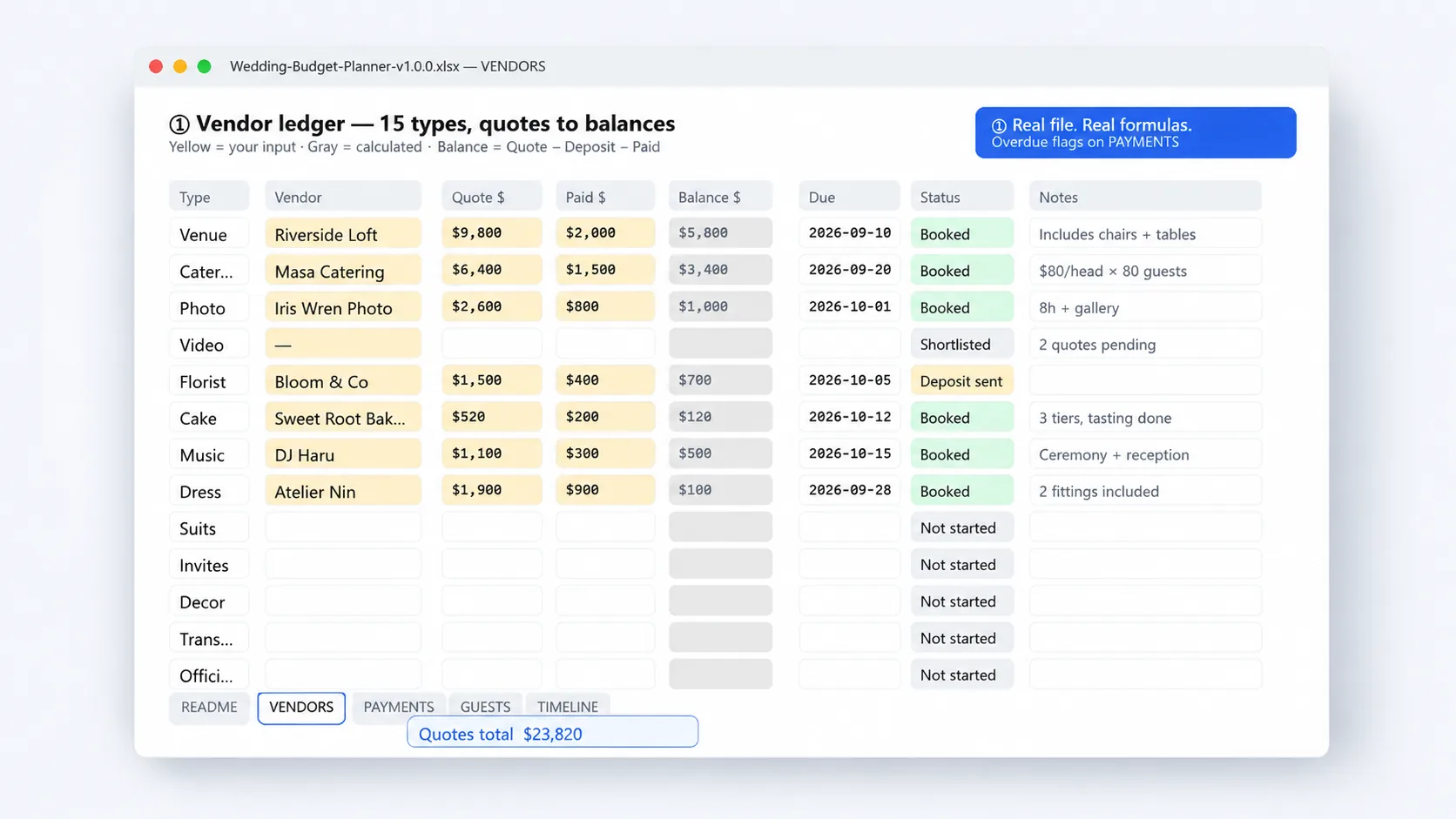
- The vendor ledger comes with 15 types ready: venue, catering, photo, video, florist, cake, music, dress, suits, invites, decor, transport, officiant, planner and other. Each row has quote, deposit, balance, contact, due date and notes. Rename or add types if you need more.
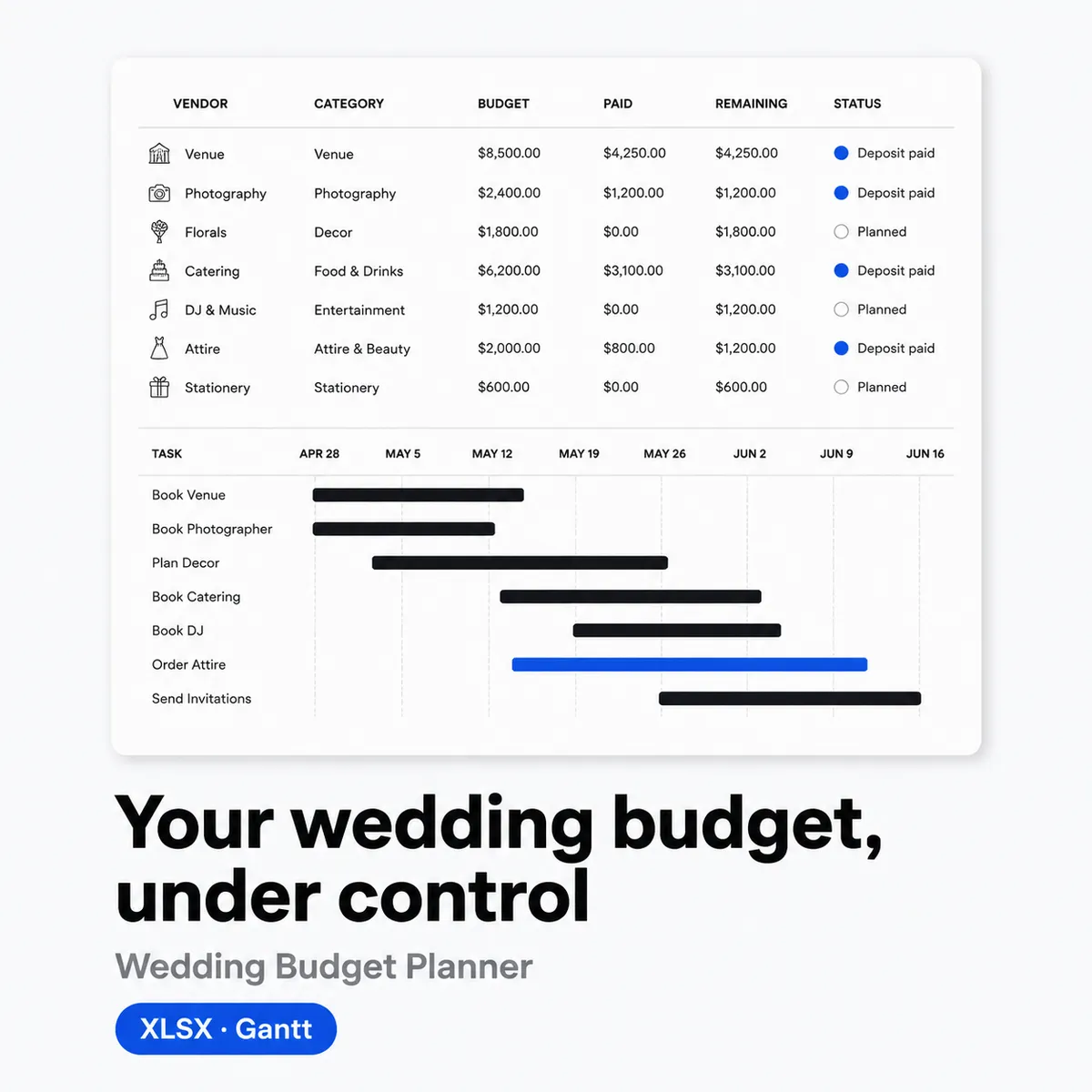
- The payment plan tracker lists every deposit and final payment with amount, due date, method and status. Filter by unpaid to see what is due this month, then check it off when paid.
- The guest list is linked to cost. Add names, invite status, meal choice and table, and the count feeds your per head math so catering does not surprise you later.
- The 12-month Gantt shows twelve months across the top and tasks down the side. Bars mark when to book vendors, send invites, do tastings and confirm final numbers. No project app needed.
Who it is for
For couples who are planning it themselves and want a spreadsheet they can actually edit. Also useful if you have a planner but want your own copy of the numbers in one place.
- You want one file that holds budget, vendors, payments, guests and timeline instead of chasing five threads
- Prefer Excel or Google Sheets to a wedding app that needs a login
- Need to see paid, due and remaining at a glance before you make the next deposit
Who it is not for: If you want a bank feed that pays vendors or an app that auto texts your guest list, this is not it. This is a sheet that keeps your numbers honest. You still make the calls and move the money.
How to use
- Set the total and list vendors. Open the Budget and Vendor sheets. Put in your total budget, then add each vendor quote in its type row with contact and due date.
- Build the payment plan. Go to Payments. Turn each quote into one or two lines: deposit and balance. Add amount, due date and status. Sort by due date to see what is next.
- Fill the guest list. Add names, invite status and meal choice. Check the count and the catering estimate before you confirm the final number with the venue.
- Follow the Gantt for 12 months. Check the month column for what is due now. Book, pay and tick it off. If your date is sooner than 12 months, just hide the early months and start where you are.
Tip: Do one pass on Sunday and update paid items right after you pay. It takes five minutes and you avoid double paying a deposit.
Limits
- No bank connection and no auto payments. You track what is due. You pay vendors yourself.
- No guarantee you stay on budget. The sheet shows planned versus actual as you enter numbers. Choices about what to cut are still yours.
- Not legal, tax or financial advice. It is a tracking template. For contracts or tax questions, ask a professional.
- Guest list is for planning and cost math, not for mass email or RSVP collection. Send invites with your own tool.
File spec
- Format: .xlsx, unlocked. Five sheets: Budget, Vendors, Payments, Guests, 12-Month Gantt. About 8 KB. Edit, sort and filter freely.
- Tools: Excel, Google Sheets, Numbers, WPS. No macros, no fonts to install, no plugins.
- Delivery: Instant download after payment. Link on the order page and in your receipt email. Log in anytime to re-download from My Account > Downloads.
- License: For one wedding or one planning business running one event at a time. Do not resell or share the file itself. Printed copies for your partner, family or planner are fine.
Changelog
v1.0.0, 2026-08-21 — Initial release. Budget with planned vs actual, vendor ledger with 15 types, payment tracker, guest list, and 12-month Gantt. Cleaned formatting for Excel and Google Sheets and checked all sums.
FAQ
Does it work in Google Sheets?
Yes. Upload the .xlsx to Google Drive and open with Google Sheets. Sums, filters and editing work the same. You can also download as .xlsx again if you need to send it to a planner.
Can I change the vendor types or add more?
Yes. The 15 types are starters. Rename a row, add rows, or change the category. The totals still update if you keep new amounts in the same columns.
What if my wedding is in 6 months, not 12?
Use the second half of the Gantt. Hide months 1 to 6 or just start from your current month. Tasks are listed by what to do, not locked to a fixed start date, so you can compress the plan without breaking the order.
What is the refund policy?
30 days. If you open the file and it is not a fit, email [email protected] within 30 days of purchase with your order number. We refund to your original payment method and confirm within 1 business day. Same policy as the store Refund page.
From the maker
I run Yixing Store myself and I make small practical sheets for people who do a lot with a little help. I built this because wedding money is stressful when it lives in emails and quick notes. One file with clear totals is calmer than five apps. If a row or a month does not fit your plan, skip it or change it. The file is yours to edit.
Sold directly by the developer
No middlemen. You buy from the person who built it and you get support from the same person.
30-day refund
Not what you expected? Email within 30 days and we put it back to your original payment method. See refund policy.
Verified-buyer reviews only
Reviews come only from buyers and are never edited. We do not publish fake reviews.

Reviews
There are no reviews yet.